
TRIOS Care Activation Guide
07/11/2023Overview
TRIOS Care is a comprehensive service agreement included at no cost for the first year with all new TRIOS scanner purchases. To access the full range of benefits, including support, training, warranty coverage, and drop insurance, the service agreement must be activated in Dental Desktop (Unite).
You may be prompted to activate TRIOS Care if:
- You have recently purchased a new TRIOS scanner that includes a complimentary 1-year TRIOS Care subscription.
- Your existing TRIOS subscription has been converted to TRIOS Care from Clinic Care.
Why Activation Is Required
During activation, you must accept the TRIOS Care Terms of Service. This consent is required before 3Shape can provide TRIOS Care services, including:
- Technical support
- Training resources
- Extended warranty coverage
- Drop insurance and other service benefits
Prerequisites
Before activating TRIOS Care, ensure that:
- Unite is installed or upgraded to version 1.7.83.0, lower versions are not supported anymore.
- You have a 3Shape ID Account. If you do not have one, it can be created during the activation process on 3shape Communicate Portal: https://portal.3shapecommunicate.com/login
- For existing installations (standalone or server-client), remove any previous dongle before inserting the TRIOS Care dongle; otherwise, the activation window may not appear.
- NOT relevant for Unite III Cloud, starting from 24.1
Note: Trios Care CANT be activated on the shadow dongle.
How to Activate TRIOS Care
Step 1: Insert the TRIOS Care dongle and launch Unite. Complete the initial software setup if prompted, or select your user profile if this is an existing installation.
Step 2: When the TRIOS Care activation window appears:
- Select Sign in if you already have a 3Shape ID Account.
- Select Create account if you need to register a new account.
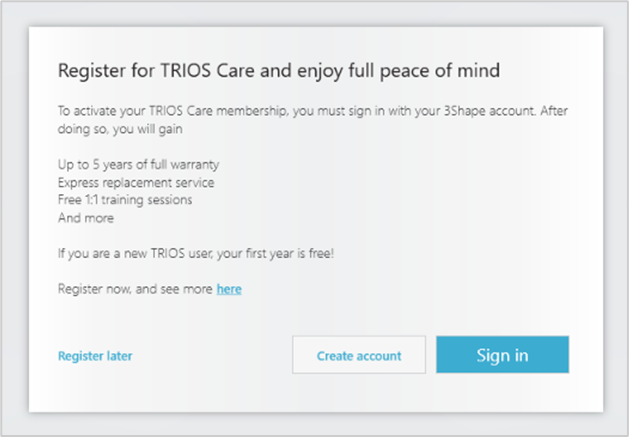
Step 3: Enter your 3Shape Account credentials and press the Sign in button.
Step 4: Review and accept the Terms of Service by selecting the checkbox "I agree to the Terms of Service", then click Confirm.
Note: To read the Terms of Service simply press the blue hyper link. You will be redirected to a page with all the content of the Terms of Service available in English.
Step 5: A confirmation message will appear indicating that TRIOS Care has been successfully activated. Select OK to continue to the Unite home page and begin using the software.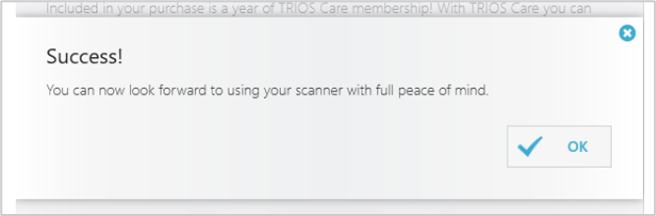
If the activation window does not appear or you experience difficulties during activation:
- Verify that your Unite version meets the minimum requirements.
- Ensure that any previous dongle has been removed.
- Contact 3Shape Support for assistance.
Service Agreement Options After the First Year
When the complimentary 1-year TRIOS Care period ends, you can:
- Continue with TRIOS Care through monthly/yearly payments and maintain full service benefits.
- Switch to TRIOS Only, a basic scan-ready service agreement with limited benefits and no monthly fee.
Learn More
Contact 3Shape Support if you have any further questions.