
Resolving "Connection Closed Gracefully" or "Out of memory while expanding memory system" with Avira Antivirus Installed
08/11/2023These errors may occur because Avira Web Protection blocks communication with certain 3Shape applications.
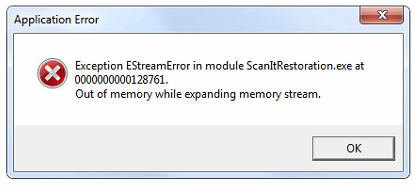
Error messages:
- "Connection Closed Gracefully"
- "Out of memory while expanding memory system"

Cause
The Web Protection feature in Avira Antivirus may block communication for various 3Shape applications, including:
- Dental Manager
- Dental System Control Panel
- Dental Desktop
- ScanIt Restoration
There is no supported way to configure Avira Web Protection to exclude 3Shape applications.
Resolution
Step 1: Right-click the Avira icon in the Windows taskbar.
Step 2: Open "Avira Control Center".
Step 3: Disable "Web Protection".

Step 4: Restart all Dental System applications.
If the Avira Antivirus settings are locked and cannot be modified, contact your local IT administrator to disable the Web Protection feature.
Contact 3Shape Support if you have any further questions.
For full information on correct usage consult the official Safety and Setup Guide and the most current Manual.